How can I report AI response issues for Checklists and Chat?
Last updated: January 12, 2026
Background
Document Crunch's AI-powered checklists and chat feature are designed to help you quickly analyze contracts and get accurate answers to your questions. However, like any AI system, responses may occasionally be incomplete, inaccurate, or not aligned with your specific contract terms. When you encounter AI responses that don't meet your expectations, providing feedback helps improve the system's accuracy and ensures our support team can address any underlying issues.
Things to Consider
Be specific in your feedback - The more detailed information you provide, the better our team can understand and address the issue
Explain the discrepancy clearly - Describe not just what was wrong, but what the response should have said instead and where the correct information can be found
Feedback goes to human reviewers - Your submission will be reviewed by our support team, not processed automatically
Steps
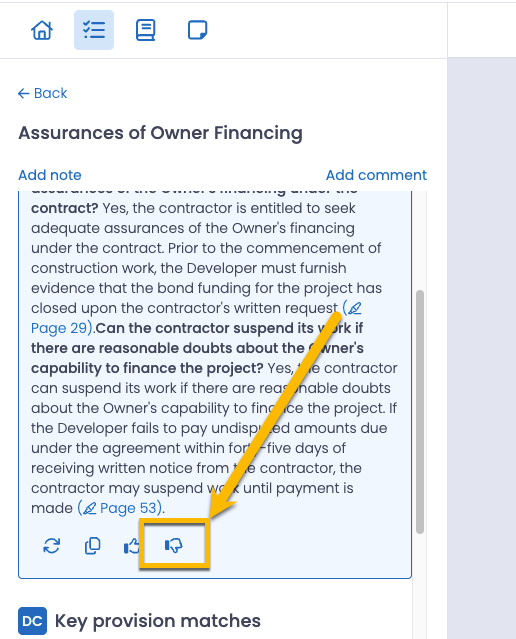
Locate the problematic AI response in your Checklist or Chat
Click the thumbs-down icon that appears below the AI response
Select all applicable issues from the provided menu options that describe what went wrong with the response
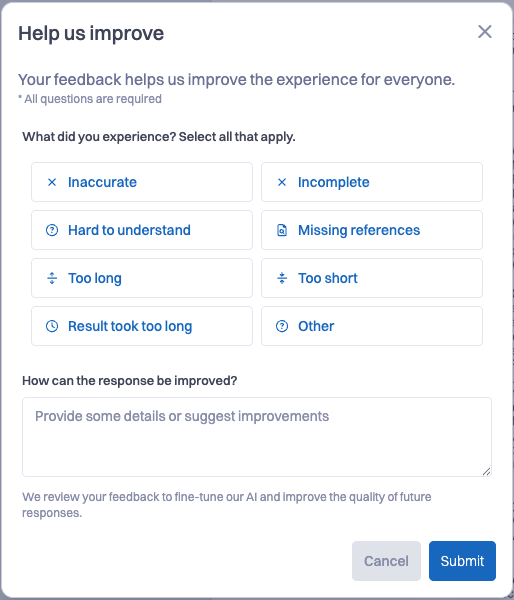
Fill out the text box at the bottom with detailed feedback including:
Why you considered the response incorrect or inadequate
What the response should have said instead
Specific contract references (clause numbers, page numbers, section titles) where the correct information can be found
Any additional context that would help our team understand the issue
Review your feedback to ensure you've provided as much helpful detail as possible
Click the Submit button to send your feedback to our support team for review and triage
Pro Tip: You can also reach out to our support team directly with any issues or concerns at support@documentcrunch.com !